

ipega-PG-9087S Wireless Game Controller Mobile phone Gamepad Joystick for Samsung Galaxy S23,S22,S21/Note20,10/oppo/vivo/one plus/LG/Android Smartphone/tablet (Android 6.0 and above)
$29.99


Price: $29.99
(as of Jun 04, 2024 08:52:07 UTC – Details)

Product Description

1.Ipega-PG-9087S is a smart wireless wireless gamepad designed for online games, targeting PUBG, shooting games, FPS,The product adopts the wireless 4.0 wireless solution, Support direct connection, connect to wireless to control the game,2.The wireless connection does not require redundant game platforms and complicated settings and activation operations!Customers need to pay attention to the following issues:3. Ipega PG-9087S is compatible with Android 6.0 and higher system mobile phones/Android tablets, (please check your own device before purchasing)4. Ipega PG-9087S does not support ios system devices, iPhone phones, and ipad tablets.5. MediaTek chip phones are not supported (please check your own device before buying)

1. Support the handle of the ShootingPlus V3 protocol, the game displayed in the software After the download button is connected, the download button preset can be played directly. If you want to play other games, you can customize your button through the ShootingPlus V3 software. .2. First, connect the handle to the mobile phone through the wireless , PG-9087S, then open the shangingplus v3 software, confirm that the handle is connected to the background, directly into the game interface, click “V3” suspended ball icon (or handle Press the START button) Enter the custom button interface, as shown.

1.After entering the custom button interface, you can drag the button icon at will. Drag to the virtual button you want to correspond to, if you think that the button icon is too much, you can drag the unwanted button icon to the [Dust Bucket] button, you can delete the button. icon.2.After entering, press and hold a blank area on the screen to start loading screenshots of the game, and click “Select Picture” to select screenshots of the game. Please take a screenshot of the picture of the main interface of the game in advance, such as “Peace Elite”

1. If you want to completely reset, you can click the [New] button. At this point, the button icon is all cleared, then press the button on the handle, press A, the A button icon will appear in the middle of the screen, drag to you want to drag it. On the virtual button, other buttons are set up.2. After the setting is complete, you can exit the custom button interface, click the [Save] button (or press the START button) to exit.Download shootingplus V3 APP, customize button settings according to different game requirements,1. In the game settings interface, select joystick settings,2. The virtual joystick should be aligned with the setting button rocker, and there should be no deviation.3. It is recommended to enlarge the radius of the virtual joystick in the setting interface. If the radius is too small, the joystick will not match the virtual joystick and will not work normally.4. You can view YouTube videos in the settings, please contact me if you have any questions, thank you

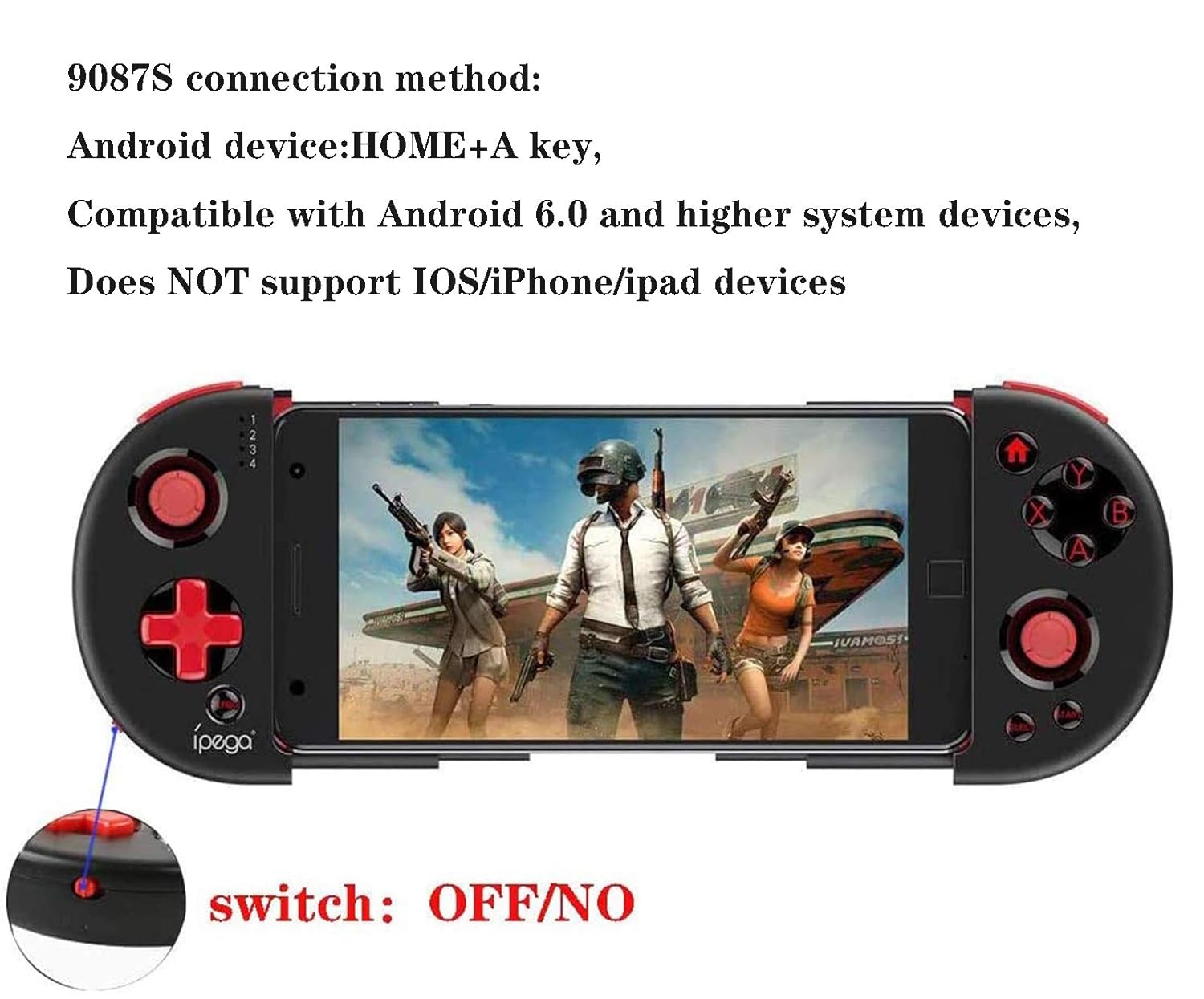
ipega-PG-9087S connection method:1. Android device: press and hold HOME + A keys at the same time,2. Note: Ipega 9087S is suitable for Android 6.0 and higher system devices3. Does not support Apple ios system devices,4. Please check the system equipment before buying, so as not to buy equipment that does not match yours, thank you

Extendable Arm-Maximum extending size is 6.2 inch (77-170mm)Compatible with mobile phone thickness ≤1.0cm

Joystick fine adjustment 0.1cmPosition the bullet accuratelyThe original imported competitive racket can be realizedAdjust the macro distance to 0.1cm front sight movement.Model: PG-9087SFeatures: Cable,JoystickConnection Type: wirelessBattery Type: Built-inBattery Capacity (mAh): 380mAhCharge way: USB ChargeWorking Time: 10hGamepad Size: 130*65*29mmPackage Weight: 127gPackage Size(L x W x H): 139*85*49mmPackage Contents: 1 x PG-9087S Game Controller 1 x User Maual
1. Please watch the video ipega PG-9087S on YouTube, thank you,1. 【Android compatibility】: Compatible with Android 6.0 and above, compatible with mobile phone models such as Samsung Galaxy S9 / S9 + S10/S10+ NOTE 10 Galaxy S20 Galaxy z /Huawei Mate 20 / 20plus/P30 P40 ,OPPO R17 ,find X /VIVO X23 X27 X30 X30 PRO /xiaomi 10/10pro Smartphones and tablets (make sure your system is Android 6.0 or higher before purchasing). Phones that do NOT support MediaTek chips.
2.【Start-up method】: NOTE: Customers must choose the startup mode for pairing according to their own devices. there are three startup modes: 【IOS V3 mode】: press and hold the Y + HOMT buttons 2 seconds to enter direct play mode ,(Does NOT support IOS 13.4 and higher systems) ,【Android V3 mode】: press and hold the A + HOMT buttons 2 seconds to enter direct play mode 【Android standard game mode】:press and hold the x + HOMT buttons 2 seconds to enter direct play mode
3. 【Download shooting V3 APP】: Scan the QR code on the manual, customers need to download shootingplus V3 APP for installation, and customize the buttons according to their own habits, it is recommended to adjust the size of the virtual joystick and enlarge the virtual joystick, The virtual joystick should be aligned with the set key shake, and there should be no deviation.
4.PG-9087S adopts wireless 4.0 wireless solution, compatible with most games on the market. PG-9087S structure is ergonomic ,Turbo-continuous hitting function makes the game more exciting, comfortable to operate; precise positioning, stretching ≤16cm / 6.3 inches/Thickness≤0.9cm) built-in 400mAH high-performance lithium battery, can Continuous use for more than 15 hours, fully charged for up to 30 days,
5. NOTE: PG-9087S gamepad is NOT compatible with Apple IOS 13,4 system and higher system devices. Apple users please confirm your device system before purchasing. If you have any questions, please contact us in time, please send us an e-mail Mail 【IOS V3 mode】: press and hold the Y + HOMT buttons 2 seconds to enter direct play mode ,(Does NOT support IOS 13.4 and higher systems) ,
Customers say
Customers like the appearance of the video game controller, mentioning it’s cool, novel, and delicate. They also say it’ll fit their Xiaomi Mi Mix 2 very comfortably. However, some customers dislike the buttons. Opinions are mixed on quality, fit, comfort, value, and connectivity.
AI-generated from the text of customer reviews
User Reviews
Be the first to review “ipega-PG-9087S Wireless Game Controller Mobile phone Gamepad Joystick for Samsung Galaxy S23,S22,S21/Note20,10/oppo/vivo/one plus/LG/Android Smartphone/tablet (Android 6.0 and above)”
Related Products



$29.99

There are no reviews yet.