

Plustek eScan SharePoint – Network Document Scanner Dedicated for Microsoft SharePoint and Office 365 – Standalone (PC-Less), 7” Color Touchscreen – 50-Sheet Automatic Document Feeder
$889.00




Price: $889.00
(as of Jun 01, 2024 17:32:55 UTC – Details)

Product Description
Optimize your SharePoint Scanning Workflow

Dedicated and Customizable Document Scanning Kiosk
The PlustekeScan optimizes your SharePoint document management by letting you add your metadata directly to the scanned document before saving it into the library. The individual logins with custom presets makes the paper works more efficiently.
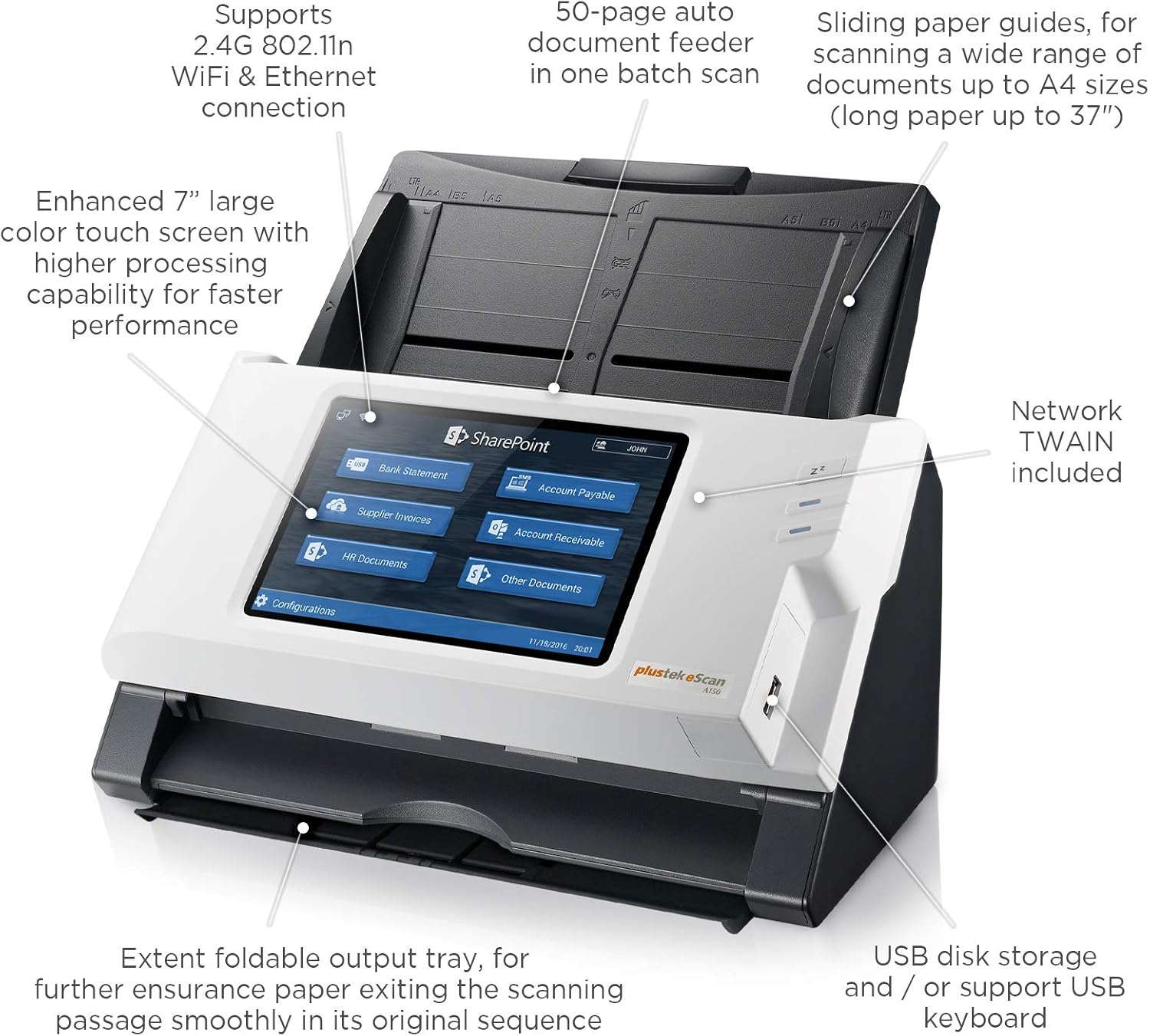
The eScan offers a full-color, intuitive interface that makes Microsoft Office365 and SharePoint accessible to everyone without extensive training. No matter what industry you work in, the eScan document-scanning kiosk can be easily integrated into your workflow.
User can log in to their SharePoint account directly through the large 7” touch panel on the eScan, with one operation, scan the batch of documents, enter index data and gets stored directly to the SharePoint library of choice.Multiple accounts can be stored on the device without installing on other PC nor servers, providing full security protection and no operating system nor server version compatibility risk.
Fast duplex scanning, scans PDF, JPG or TIFFRigid card and multiple paper weight scanningBuilt-in image enhancement, cropping and blank page removalSupports network TWAINAttach a USB keyboard (not included) for convenient credential login and file namingPortable unit provides privileged access, privacy and convenience


PC-Less, Standalone Network Scanner
No PC nor serverneeded! This high-speed all-in-one network scanner includes everything you need and features a 7” touch screen and built in keyboard. It connects to your network via WiFi or Ethernet.
Supports SharePoint On-Premises Server
The eScan SharePoint supports the following SharePoint On-Premises versions:
Microsoft SharePoint 2010Microsoft SharePoint 2013Microsoft SharePoint 2016
Supports Office 365
SharePointOneDrive for BusinessOneNoteOutlook
Supports Other Microsoft Services
ExchangeAzure File StorageSMB 2.0SMB 3.0


Built-in Barcode Recognition
Supports up to 12 barcode types, including both 1D and 2D barcodes (QR Codes). With a few configuration user can rename document and split documents with ease.
Scan with Watermark
Adding a watermark to your personal or corporate scanned documents helps ensure confidentiality of your documents. Create logo, image, or text watermarks under the configuration menu in a few taps!
Supports Metadata
Supports all SharePoint library metadata fields. Users are automatically prompted to enter metadata before documents are uploaded directly to the destination on the eScan interface.
Administrator Management
Stress-free management. Simple configuration can be made quickly and easily to prevent unauthorized access scanning. Unique profiles can be created for various single-touch scanning task.

Create Unique Account Settings and Profiles
eScan SharePoint is built with intuitive interface with a simple one-touch scanning feature. It is an optimized experience for all users, faster storage, easy to locate with index data, organize and straight to its respective SharePoint account and libraries. The devices can store multiple SharePoint accounts and choose to scan to respective libraries based on each individual user’s preference, coup with password protection to increase user authentication and protection.
Share the eScan network scanning in a department/company/corporation. Group the buttons for easier access. Whether its contracts, agreements, invoices, applications, receipts, business cards, embossed cards, or others, unique buttons can be configure to meet the user’s demand-making scanning that easy!
Utilize the built-in enhanced image processing for inserting watermark, remove blank pages, remove punch holes, or recognition tool to rename the document to the barcode information.
SHARE reports instantly: sends documents directly to your destination and share freely without going through a PC for company-wide collaboration easily.Increase efficiency: eScansends your document with greater efficiency; no need to wait for the copiers. Index and upload to relevant SharePoint library.Small footprint: Maximizing productivity, with a small footprint that fits perfectly in any location, securely with user authentication.

Plustek eScan SharePoint – Outstanding Achievement in Innovation, Summer 2018
Many businesses rely on Microsoft products like Office 365 and SharePoint to drive their operations. In fact, Office 365 boasts 120 million business users, while SharePoint is installed in over 250,000 businesses. Despite enormous adoption across virtually any industry you can think of, manufacturers haven’t developed a scanner that is built specifically to work with Office 365 and SharePoint..until now. The PlustekeScan SharePoint is a PC-less scanning kiosk that enables users to scan documents to specific folders in SharePoint, Office 365, Azure File Storage, OneDrive, and Outlook.
“The PlustekeScan SharePoint is a must-have scanner for environments where paper documents intersect with workflows in SharePoint or Office 365.” remarked Lee Davis, Editor of Scanner and Software Evaluation Keypoint Intelligence – Buyers Lab. “Users can enter indexing data directly from the device’s seven-inch color touchscreen display before routing them to specific folders in SharePoint or Office 365 profiles can be individualized to meet each user’s needs, securing sensitive data and improving efficiency.”
About Buyers Lab Outstanding Achievement Awards
Buyers Lab Outstanding Achievement awards acknowledge products or capabilities that stand out for attributes such as innovation, usefulness, and value.
Add to Cart
Customer Reviews
2.5 out of 5 stars
4
—
3.2 out of 5 stars
35
Price
$889.00$889.00
—
—
Suitable For
For Microsoft SharePoint & Office 365 Users For large organizations For groups & office personnel
Preview
Yes Yes Yes
Metadata
Document Check-Ins / via XMP via XMP –
Configure Job Button Profile
Yes Yes –
Barcode Recognition
Up to 12 barcode types Up to 12 barcode types –
Advanced Image Processing
Watermark / Punch Hole Removal / Blank Page Removal / Blank Page File Split / Manual File Split / Barcode File Split / X Number of Scan File Split / Merge Images / Fill Edges Watermark / Punch Hole Removal / Blank Page Removal / Blank Page File Split / Manual File Split / Barcode File Split / X Number of Scan File Split / Merge Images / Fill Edges Watermark / Punch Hole Removal / Blank Page Removal / Blank Page File Split
Remote Setting
Yes Yes –
Passcode Management
Job Button / Configurations / System Settings / Add Account / Disable USB Storage Job Button / Configurations / System Settings / Add Account / Disable USB Storage System Settings / Security Mode / Disable USB Storage
Protocol
TWAIN / Network TWAIN TWAIN / Network TWAIN TWAIN / Network TWAIN
Support SharePoint Online (Microsoft Office 365), SharePoint On-Premise (2010/2013/2016), OneDrive for Business, Outlook, Exchange, OneNote, Azure File Storage, network folder (Share folders/ SMB 2.0 and 3.0), and USB disk
Scan documents and their metadata directly to destination storage without a PC
Barcode recognition automatically separates documents for easy bulk scanning
Customized individual account settings for required or repeated tasks
Fast duplex scanning (25ppm) , scans PDF, JPG or TIFF with privileged access and privacy control
User Reviews
Be the first to review “Plustek eScan SharePoint – Network Document Scanner Dedicated for Microsoft SharePoint and Office 365 – Standalone (PC-Less), 7” Color Touchscreen – 50-Sheet Automatic Document Feeder”
Related Products


$889.00

There are no reviews yet.