

Joso Mobile Gaming Controller for iPhone, Android, PC, Nintendo Switch, PS4, with LED Light, Dual Vibration/6-Axis Gyro/Macro Programming/Turbo, Gamepad for Android/iPhone, with Phone Holder
$29.59


Price: $29.59
(as of May 27, 2024 19:45:46 UTC – Details)

Product Description


CONTROLLER FOR IPHONE/IPAD/MAC/MACBOOK
iOS Mode Bluetooth Connection Guide
1. Press the ‘A + HOME’ button at the same time for 2s to enter the iOS mode, the controller indicator light 4 flashes quickly when the iPhone searches for the device name of ‘DUALSOCK4 Wireless Controller’ select the connection.
2. After the connection is successful, the LED4 light will be on for a long time. It has been successfully connected, you can directly press the ‘HOME’ button the green light will flash slowly, and the connection will be automatically returned.
CONTROLLER FOR ANDROID PHONE/TABLET/NOTEBOOK
Android Mode Bluetooth Connection Guide
1. Press the ‘Y + HOME’ key at the same time to enter the standard Android mode, the controller indicator light 3 flashes quickly when the Android phone searches for the ‘ S03’ device name select connect. After the connection is successful the controller will light up in green.
2. NOTE: For’ Call of Duty & Apex Legends Mobile ‘games on Android, please follow below steps to connect controller, Press‘R + Home’ for 2s to connect, Bluetooth name: Xb0x Wireless Controller, Indicator Light: Blue
WIRELESS CONTROLLER FOR NINTENDO SWITCH/OLED
How to Connect to the Switch Console
1. Open Switch console – System Settings – Controllers and Sensors – Change Grip/Oder enter into the Switch console pairing mode interface.
2. Press’ZR button + HOME button’ on the controller for 2 seconds to enter the Switch mode pairing, the green LED light flashes quickly, then press ‘L+R’ on the controller, and the pairing is successful, the green light is on for a longtime.
CONTROLLER FOR PS4/PS3
How to Connect to the PS Console
1. Connect the controller directly to the PS3/PS4 console with a TYPE-CUSB data cable, and press ‘HOME’ for pairing, after successful pairing the 1, 3 indicator light is always on.
2. It has been successfully connected, you can directly press the’ HOME’ button the green flashes slowly. and the connection will be automatically reconnected.

PC CONTROLLER
How to Connect to the PC
1. Press the ‘L’ key + ‘HOME’ key simultaneously for 2 seconds to enter the computer mode.
2. Click on ‘Xbox Wireless Controller’ to connect, the controller indicator light 1, 2 flashes quickly, after the connection is successful, the indicator lights 1 and 2 of the controller are alwayson.
3. It has been successfully connected, you can directly press HOME and the green light will flash slowly to automaticallyreconnect.(The Bluetooth receiver is not included in the package.)

COOL LED LIGHTING DESIGN
Light Adjustment
1. Three LED lighting effects.
2. After booting the controller, it is under the default mode of LED Breathing Mode. Press ‘Light adjustment‘ key’ once, fixed the LED light color at current.
3. Press ‘Light adjustment’ key again, close the LED light.
4. Press ‘Light adjustment’ key again, back to the seven-color breathing light cycle mode.
 How to Adjusted:
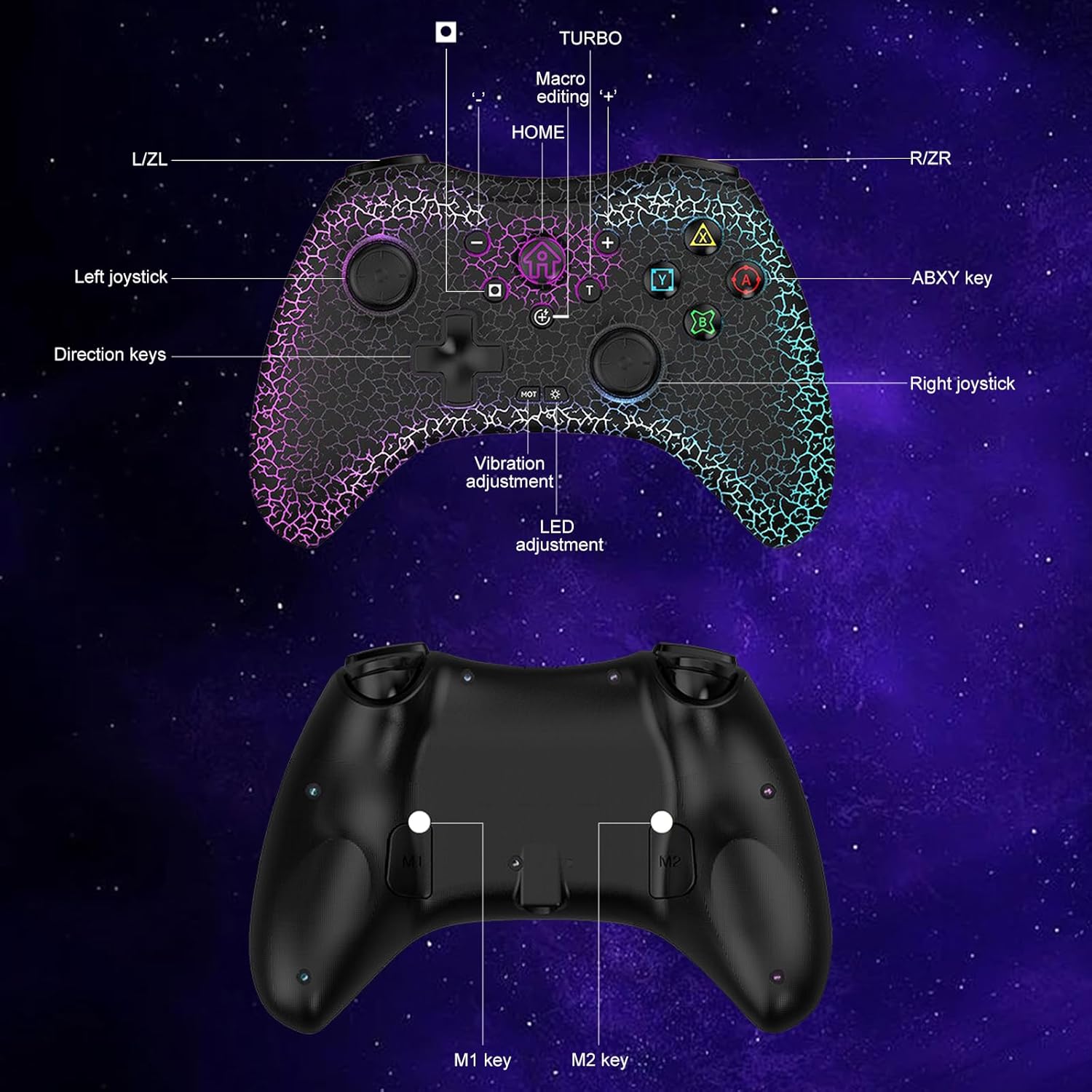
Each time the ‘MOT’ key is pressed, the vibration of the motor will be adjusted in turn:
4 Vibration Levels: 0% – 50% – 75% – 100%
 How to Set:
1. Press and Hold ‘T key, then press the key you want to set for turbo function (such as ‘A‘ key).
2. Release’T’ key, then setting is done.
 6-Axis Gyro
Built-in 6-axis gyro, somatosensory tracking flexible movement and direction change, speed, and precision.
 How to Set:
Press ‘programming keys + M1/M2’ for 3s, then press the key you want to set for programming function, press ‘M1’ key again, setting is done now.
More Switch Controllers From Joso
Add to Cart
Customer Reviews
3.1 out of 5 stars
6
3.1 out of 5 stars
6
3.8 out of 5 stars
40
3.2 out of 5 stars
3
3.2 out of 5 stars
3
Price
—
—
$29.99$29.99
—
—
Compatibility
Switch/OLED, PC, iOS, Android
Switch/OLED, PC, iOS, Android
Switch/OLED, PC, iOS, Android
Switch/OLED
Switch/OLED
Feature
With 4 programming back keys
With 4 programming back keys
With 2 programming back keys
With 2 back keys & LED light
With 2 back keys & LED light
Color
Black
Black
Black
Black
White
Charging Ports
USB Type-C
USB Type-C
USB Type-C
USB Type-C
USB Type-C
LED Indicators
√
√
√
√
√
🎮【Multi-Platform Compatible】: Bluetooth 5.0 connectivity with ultra-low latency. The Bluetooth gaming controller compatible with PS4, PS3, Nintendo Switch, PC(Steam Deck), Mac, MacBook, Notebook, iOS, Android. (The package comes with a phone holder that can hold a phone under 6.9 inches, play mobile games anytime, anywhere, play mobile games directly without mapping, no need to download other apps)
🎮【7 Colors LED Light & Different Modes】: The Bluetooth gamepad with 7 colors breathing light, 3 different light modes( 7-Color light/Monochrome light/Turn off the light) players can set the gamepad according to their favorite light mode.
🎮【Turbo Function】: Press and Hold ‘ T’ key, then press the key you want to set the corresponding button A/B/X/Y/L/R/ZL/ZR to turbo function according to your needs, free your fingers and adjust the turbo speed to fit different games.
🎮【Macro Programming Function】: The gaming controller has 2 back programming buttons with single or multiple programming modes, M1/M2=A+B+Y+X+L+ZL+R+ZR+L3+R3+D-pad, custom programming keys to help improve the gaming experience and extend the life of the controller buttons.
🎮【Dual Vibrate Adjustable & 6-Axis Gyro】This controller equipped with adjustable dual vibration and give you 4-level precise vibration: 25%/ 50%/ 75%/100%. Making you feel the real game experience. With the 6-axis gyro sensor, this controller can detect the inclination of the controller and make a quick response, give you more fun while playing motion sensing games.
User Reviews
Be the first to review “Joso Mobile Gaming Controller for iPhone, Android, PC, Nintendo Switch, PS4, with LED Light, Dual Vibration/6-Axis Gyro/Macro Programming/Turbo, Gamepad for Android/iPhone, with Phone Holder”
Related Products


$29.59

There are no reviews yet.